101 Codemods
Last Updated: Jan 10, 2026
How to write codemods (for ink)
Codemods are transformations scripts used to programmatically modify large codebases. The ink team uses codemods to refactor extensive areas of legacy code, reducing the time it takes for teams to manually migrate from deprecated and sunset components.
- jscodeshift is the popular choice of tool and should be your first stop
- Codeshift Community has many guides on how to get started
- AST Explorer is a great place to write and test out a script. You will want
Javascript,</> flowandTransform (jscodeshift)selected. - Babel types may also come in handy for identifying selectors
We also have an #ink channel for further questions.
To transition a component, determine how an old component's prop renders visually and functionally with the new component. There isn't always a 1:1 parity, so some transitions are better performed manually. Transitions too complex may not be worth automating.
Prop transition categories
Component props will fall into one of the following groups:
- Stays the same
- Simply rename (props or values)
- Migrate with caution (not quite a 1:1 parity, usually requires human intervention)
- Use a migration guide (too complex, not worth the time)
Less complex
(1) and (2) are simple and worth writing a script for the automated refactoring pipeline. To ensure the codemod can standalone, we skip all components that include even 1 prop from buckets (3) or (4). The pipeline should automate all scenarios that don't raise questions, and are effortless to migrate.
More complex
(3) puts the focus on migration guides that show our engineers how to do transitions manually. The write up should include playrooms, snippets, and any visualization needed to make it simple. Consider transitioning these props in a script if it's initiated by a human only since you know the intervention will happen.
(4) relies completely on migration guides. An example would be Table to NewTable. The structure is completely different, so it would be difficult and time-consuming to write this transformation. However, a script for converting old Table headers <Table header={['','','']}> to NewTable.Head's syntax could be a consideration for speeding up the migration process.
Create a comparison playroom
The recommended approach is to create a side-by-side playroom comparison. Advantages include:
- Testing the UI in real time to ensure there's no surprise CSS (e.g. negative margins)
- Functionality breakages due to API change (e.g. different controlled states, different required props). Compared to
Typeaheadwhich only needs options,NewTypeaheadrequires more props to achieve a minimal working state (options, value, onChange, optionLabel, input and filterOptions).
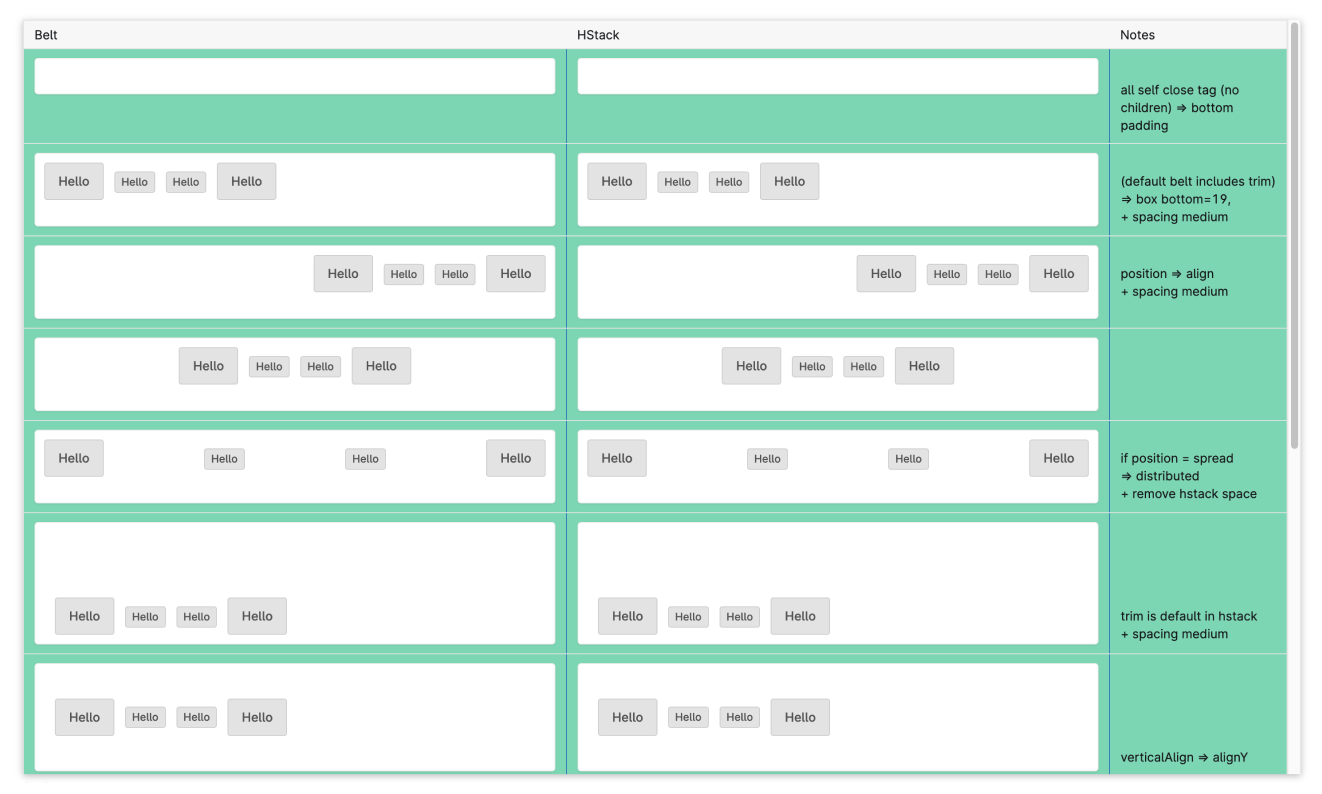
- Use 3 columns to represent the old, the new equivalent, and prop notes
- Use Tile on a color background helps compare margins that may not be apparent at first glance
A migration guide is part knowledge transfer and part tutorial. Teach everyone how to complete the task. This process is easier to understand when including interactive demos like playrooms, code snippets, and images. Don't write a novel!
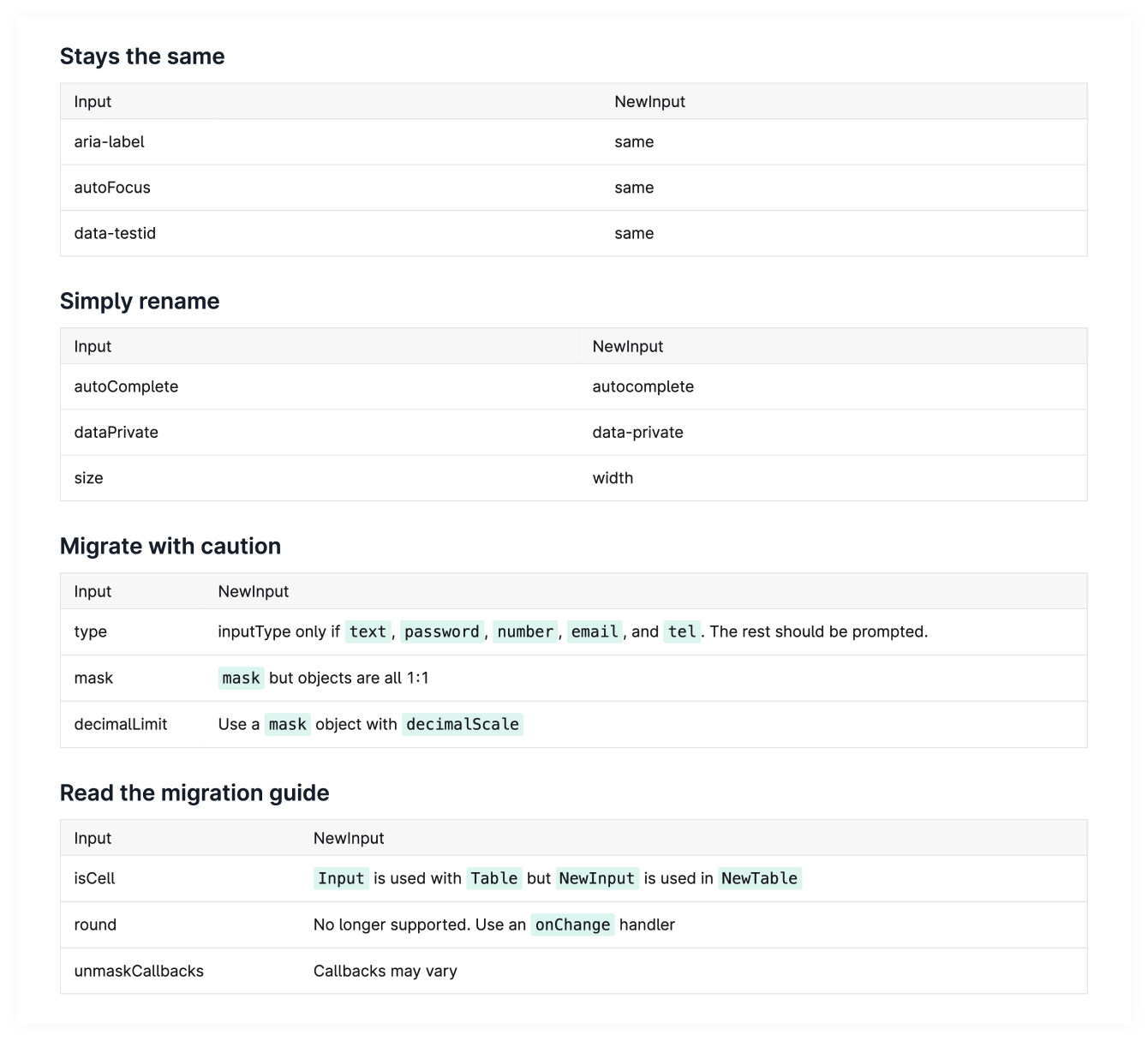
Before writing the codemod, organize the prop transition categories into tables for the migration guide. Even if there was nothing else written, this documentation is be helpful to show our engineers how to do transitions manually.Markdown tables generatormakes this task very easy.
Example of prop buckets in a guide
You can find all scripts written by the ink team in this folder.
- Codemods are available to add or remove individual props.
- Large migrations of entire components, such as Belt to HStack, include contextual documentation to help step through the thinking process.
Skip and/or prompt scenarios
Sometimes a manual migration is faster, if tweaks are required, or logic is too complex to automate. If a codemod is only running in a few files, you could call out the issue in the console for intervention or prompt for human input. However, for a large amount of files, it may take forever to exit a questionnaire.
- Prop spreads (e.g.
{{...{ key }}}) - Expressions (e.g.
prop={someConst || notString}) which are hard to account for - Components inside Redux forms can be tricky or need extra QA
Common import methods
Each import is known as an ImportDeclaration. Common ways ink components are imported include:
"import {Component} from '@carta/ink';"
If a file had all 4 of these, there would be 4 to traverse. Since files are linted, there should only be 1 @carta/ink package import per file. Deprecate components that come from @carta/ink/deprecated will need a second query.
Remember to update imports only if we made at least 1 modification to a file. If there has been no modifications (e.g. all skipped), we don't want to make any changes.
- Add new imports for all components added programmatically
- Preserve imports in files when necessary
- Prefix modifications (e.g.
Ink.)
Common import types
Common types of imports to account for:
| Import Type | Example |
|---|---|
| ImportSpecifier | import { Component } |
| ImportSpecifier (alias) | import { Component as Alias } |
| ImportNamespaceSpecifier | import * as Ink |
import * as Ink, { Component, Component }in theory would be ↓
import ImportDefaultSpecifier, { ImportSpecifier, ImportSpecifier }Identify a component in the tree
Common ways to identify our components:
| Node Type | Description |
|---|---|
| Identifier | Belt |
| JSXIdentifier | <Belt> |
| JSXMemberExpression | <Ink.Belt> where Ink is an object and Belt is an property, both are Identifiers |
This includes all self-closing tags where the closingElement is null and children is an empty [].
Test files
In jest files, we only need to make an update to the Identifier for props that stay the same (1)
- e.g.
expect(wrapper.find(Belt)).toHaveLength(1)
For props in transition categories (2), (3), and (4), we may need to update them manually
- e.g.
component.props().isInvalidmight becomecomponent.props().invalid
Typescript files
Typescript files (.tsx) have different identifiers
- e.g.
StringLiteralrather thanLiteralso using.includes()comes in handy.
Remove empty packages
If an imported package is empty after a transformation, don't forget to remove it! This is more common with deprecated component migrations.
Lint necessary files only
If a file needed linting prior to running the codemod, but no transformation had to happen, skip prettier.
Testing your codemod
During the process of writing a codemod, you will likely want to test it to make sure it modifies all of the files you expect it to modify.
In order to verify this, follow these steps:
- Create a codemod test branch on carta-web, or whichever other repository you are targeting.
- Run your codemod on that branch.
- Create a draft PR on GitHub (don't open the PR up for reviews if you're still in the testing process!)
- Run the following command:
./ink pr get-files -p {pull_request_number} -r {repository_name} -o {repository_owner}(In this command, repository defaults to "ink" and owner defaults to "carta".)
This will spit out a list of all the files in your test run pull request. You can then compare that list against the list of files you expect your codemod to touch.
We have created many helpers for writing migration codemods. Here are some additional tips gathered from previous component migrations.
Find all opening tags
Ultimately, your method depends on your own coding style. We could look directly for the component, usually a JSXElement but it would require multiple queries to match <Ink.Belt>, <Belt> and any aliases. A slightly faster approach is to search for the lowest common denominator, the component name (e.g. Belt) and traverse back up the tree (e.g. .closest(j.JSXElement)).
Remove a prop
Props are returned in an array[] (openingElement.attributes). One method to preserve the order when removing props is to traverse backwards and use .splice(i, 1).
Replace a component
In pseudocode, the idea is to shift the nodes around:
const newWrapper = NewWrapperComponent (such as a Box)const currentCopy = CurrentComponent (after modified props)CurrentComponent = newWrappernewWrapper.children = currentCopy
All related tests, samples, documentation, and guides should be removed with a component.